2016 Dirty Kanza Part VI – Hitting The Wall

Pic above 65 miles into the 2016 DK200.

Note:  this post is about my first-ever Dirty Kanza 200 experience on June 4, 2016. 

Read Part I – The Signup

Read Part II – Prep / Training

Read Part III – Friday

Read Part IV – Starting Line

Read Part V – Checkpoint One

Part VI – Hitting The Wall

Read Part VII – Checkpoint Two

Read Part VIII – Checkpoint Three

Read Part IX – Finish Line


Only 65 miles into the Dirty Kanza 200 and already getting worried; running at higher levels than anticipated.  Heart rate was a full 10 beats per minute over the expected.  Was this a malfunction in the HR monitor?  No, it’s working correctly.  This terrain was far more challenging than what I’d trained for and was causing me to work harder maintaining a decent pace.  I knew that going in but hearing about something and experiencing it firsthand are two different things.

By this time Checkpoint One was 15 miles behind.  That is when I began to sense the trouble.  Stomach had just stopped working.  I could nibble but had lost a real appetite.  I knew eating was the only way keep going.  At mile 50 you are fueling for mile 100.  Stop eating and run out of gas fifty miles later – he’s dead Jim.

Checkpoint One is where the mistake was made of replenishing all fluids (about 3L) with a combination electrolyte and calorie replacement mix.  The reasoning was sound.  Didn’t want to eat, maybe could compensate by drinking.  Normally on a day like this (hot), it would be half pure water, half EFS (chosen mix).  Ten miles past that checkpoint the mixture had become warm/syrupy/sweet/salty and it took everything I had just to continue drinking – it.

What I’d have given for a cold bottle of plain water!  My body was becoming dehydrated and that plays tricks on the mind.  Began to fantasize about how good that water would taste.  Longing for it.  Yet I still had over 35 miles before Checkpoint Two, during an unsupported race, no aid stations, towns, quickmarts or help from my support team – unless I wanted to quit.

Around this time a jeep was passed, parked on a hilltop, off the road about 20 meters.  I stopped and hailed the driver.

“I’ll give you five bucks for a bottle of water,” I told him, only half joking.

The driver chuckled and replied he’d be happy to “give” me one.  I found out later he was a member of a Kansas City jeep club that patrols the area every year.  Not sure what their mission is specifically but suspect it’s to act as first responders when things go awry for riders who get in over their head.

That bottle was a small one, but got me another 10 miles, before once again thoughts of dehydration set in.  Knowing these races are as much mental as physical I squelched the negative thoughts, took another swig of the knarly mix, and dug in for the next big climb.  Whoever said Kansas was flat never rode these sections.  Checkpoint Two was still over 25 miles away so I had to make the most out of the resources I had.  Nasty or no I’m gonna drink that swill.

About halfway into the next hill my left quad began cramping.  Brief stabs of excruciating pain.  Felt like a sharp knife being inserted deep into the muscle.  “No!” I proclaimed loudly and pounded on the leg using my left fist as a hammer, followed by an attempt to massage away the spasm by grasping it fully and squeezing hard.  I’m sure any riders who were nearby thought I had gone stark raving mad.

“This is NOT going to happen!” I cried again, nearly at the top of my voice.  After months of training, with it’s thousands of miles and expenditures, not gonna end here, like this.  As the cramp eased I worked my way, slowly, over the top of the hill, pedaled gently down and steadied myself for the next big climb, with it a new concern…

20160604_115430

Next Post: Part VII – Checkpoint Two
 

Why Bugs are Good

Goes against the grain of conventional wisdom.  The nastier, the better.  How can this be?  Let me state the ways.

  1. Status.  It demonstrates an active project.  If you go to their bug tracking page and can’t find a bunch of open defects, something is wrong.  It’s dead, Jim.
  2. Relevance.  Shows that people are using it.  Early on, I once heard a developer proudly proclaim his code never has bugs.  That I still remember 25 years later is a testament to how profoundly stupid of a statement it was.  If your code doesn’t have bugs, it’s not being used.  The more it’s used, the more bugs to find.
  3. Excellence.  Bugs bring out the best in us by challenging our assumptions and testing our abilities.
  4. Openness.  Let’s admit it, we only hide when embarrassed or scared.  Much better to own up, accept the consequences, move on.

LDAP is dead. Long Live LDAP!

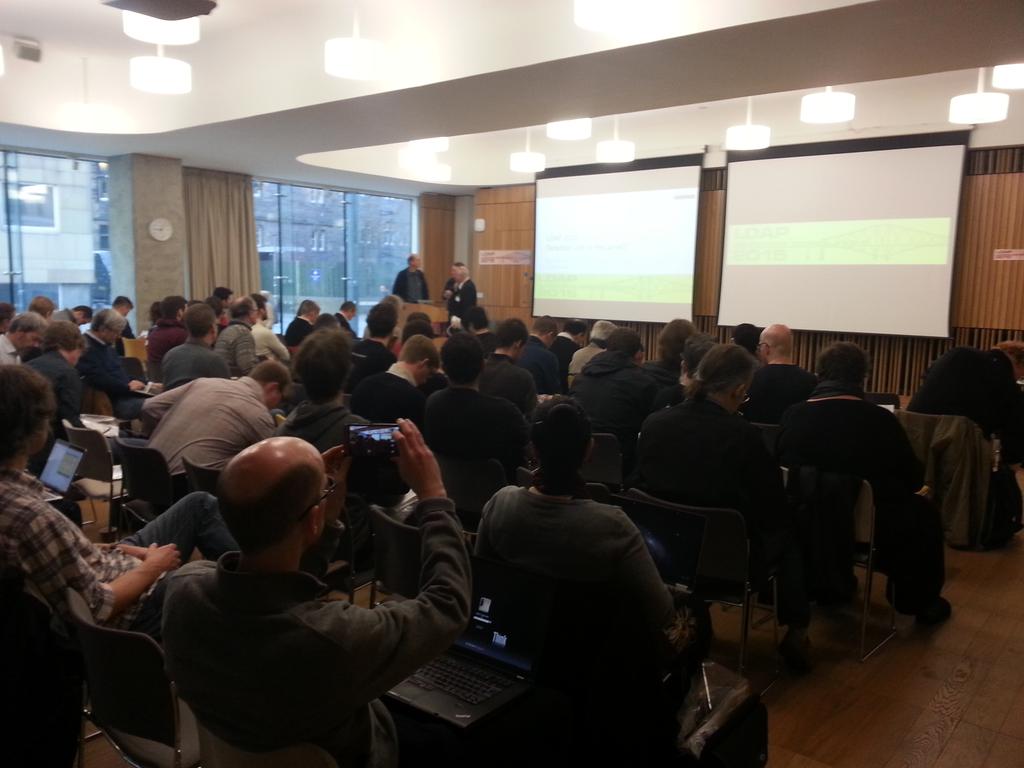
David Goodman’s keynote, LDAP 2020 Paradise Lost or Regained?, provides a retrospective for us to contemplate. In it, he describes LDAP’s roots (X.500), where it’s been (U of Mich, Netscape, Sun, Symas, Microsoft, ForgeRock, etc.), and offered insights of what needs to change.

Bottom line, it’s healthy to continually ask the question – Is LDAP dead?  For the answer, we’ll only slightly alter Mark Twain’s famous quotation:

Reports of LDAP’s death have been greatly exaggerated.

Why is that?  For starters, because of conferences like LDAPCon. More than its in-depth technical analysis and tutorials, is what happens in the spaces between the talks.

These spaces nurture the protocol by allowing free discussions on the flaws, and room to create plans for corresponding fixes/enhancements.

Just what are these fixes and enhancements?  Have a look at the program and slides.  Subscribe to the LDAPExt mailing list, share in best practices, and above all, keep attending LDAPCon!

See you at LDAPCon 2017!!

JavaOne Survival Guide

With next week being my 12th time at JavaOne, here’s some wisdom for those who’ve never been.

  1. Use the schedule builder.  Many sessions fill up early and if you didn’t reserve your seat you’ll be stuck in overflow.

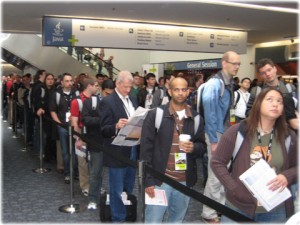
  2. Don’t miss the Oracle Appreciation Event.  It’s one of the hottest attractions in San Francisco.  Event bracelets are highly sought after and traded by the locals on the free market.  I recommend leaving well in advance of the encores to avoid the long queues that gather for the return bus trip.

  3. Enjoy a brew at the Thirsty Bear a block from the Moscone center.  You’ll be glad you did.  And don’t skip the tapas.

  4. Attend the BOFS.  More casual (and fun) than the event keynotes or technical sessions.  BOFs are a great way to meet the leading minds working with Java.  The relaxed format encourages audience participation and are a way for your voice to be heard.
  5. Trouble reserving a room within your price range nearby?  Try renting an Airbnb apartment.  Often times apartments may be rented for a fraction of the cost you would otherwise pay for a hotel room.
  6. Take the BART.  No need to rent that car or pay $40 in cab fare.  BART has terminals at both local airports, is fast, easy and cheap.
  7. Get out and walk a bit.  Market Street (shopping), Union Square (more shopping), and China Town (eating and sightseeing)  is walking distance from the conference hotels.  Better yet, stop by the Embarcadero for a ride on one of the ferries shuttling commuters across the bay.

    If you’re lucky you might snag a bar seat at the Slanted Door which is one of the best restaurants in town.

    Need a laugh?  Check out Pier 39’s Sea Lions at the Wharf.

  8. Stay until Friday.  Avoid the mad rush to the airport on Thursday afternoon.  The conference pace slows to a crawl which is nice after all the earlier hustle and bustle.  There’s usually plenty of free beer left as Oracle tries to drain the last of the kegs.

The Seven Deadly Sins

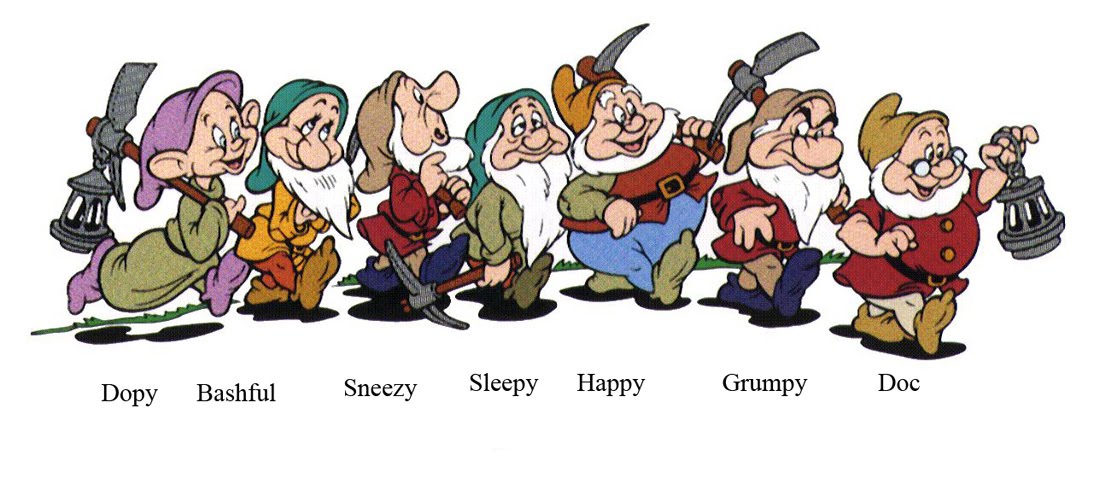
These personality traits destroy engineering projects:

  1. Stupidity is the most obvious toxic personality trait found on this list.  Engineers of this caliber leave a trail of destruction wherever they go.  Under qualified for all but the most basic tasks, ill-equipped to solve problems, repeatedly makes the same mistakes, requires constant hand-holding 1
  2. Hubris is harder to spot because the possessor’s swagger acts as a cloaking device.  Eventually the weight of repeated faulty assumptions catches up.  Known for diving headfirst down rabbit holes and not pulling back until after the damage is done.  Frequently the naysayer, stands in the way of practical solutions in favor of counter proposals with snowball chances in hell.
  3. Sloth a.k.a the sandbagger. Tasks of critical importance somehow are never their responsibility.  First to give up, known for coming in late, leaving early and disappearing for long periods of time.  Taken alone, they cost, but one resource. Beware the sandbagger however, their presence Demotivates.
  4. The Over-extender is the least undesirable due to good intentions.  Doesn’t know how to say ‘no’.  They hurt projects because of bottlenecks created by unfinished tasks.
  5. The nitpicker can’t shut up.  Feels the need to speak the truth in spite of the greater good.  Their constant stream of disparaging comments damages morale.  Worst when found in the leaders; the spawned negativity permeates the atmosphere with fear and dampens creativity.
  6. The micro manager will expect a detailed explanation for everything under the sun.  Has an obsessive need to stay informed about every nuance.  Can be dangerous in a crisis, delaying first responders when their presence is most needed.
  7. Fear a.k.a. Elmer the FUD, is stuck in the past.  To say Elmer’s overly conservative is an understatement.  Frightened by anything new and blocks innovation reflexively.
  8. Bonus: The Firestarter, a.k.a. gaslighter, ignites the workplace with artfully applied little jabs. Twisting words of coworkers seen as rivals into insults, just for kicks. One way to counter is to play dumb and have them repeat, “Sorry, I don’t understand what you mean… What did you say?”

Footnotes

1. We’re not talking about trainees here. Professionals with many years of experience and incapable of functioning without help within their core competencies.

JavaOne Open Source IAM Expert Panel

Once again we’ll be meeting in San Francisco for a Birds-of-Feather.

Open Source IAM Expert Panel Part 4


Abstract
There is a growing need in the market today to provide open source identity and access management (IAM) solutions that are both comprehensive and easy to use. Despite this growing need, the track record for open source solution providers in this space has been mixed. This session provides an opportunity for dialogue between those that need such products and those that create them. The goal of the session is to provide the attendees with information for better exploiting the products available today and to answer any questions they may have. At the same time, they get an open forum in which to provide ideas on what needs to change going forward.

Panelist
Igor Farinic, Senior Software Engineer, Cofounder, Evolveum
Les Hazlewood, Cofounder and CTO, Stormpath
Misagh Moayyed, Software Engineer, Unicon, Inc
Bill Thompson, Director, Digital Infrastructure, Lafayette College

Moderator
Shawn McKinney, Systems Architect, Symas

Schedule
October 26, 7:00 pm – 7:45 pm | Hilton—Plaza Room A
BOF (Birds-of-a-Feather) Session

Slides from previous events

  1. Part I – October 1, 2012
  2. Part II – September 23, 2013
  3. Part III – September 30, 2014
  4. Part IV – October 26, 2015

Apache Fortress SAML Demo

The aim of this tutorial is to connect Apache Directory Fortress with Spring Security SAML and a common Identity Provider – SSO Circle.com. It’s not intended to highlight all of the possible locations in code where security checks may be applied.  For that take a look at The Apache Fortress End-to-End Security Tutorial.


Fortress SAML Demo

Go to https://github.com/shawnmckinney/fortress-saml-demo, complete the steps under the README.

More info here: Fortress-Saml-Demo

Saml-Demo-Block-Diagram-Master

What Are Temporal Constraints?

Defined

Ability to control when an entity activation occurs based on time and date criteria.  Temporal constraints are typically applied during User and Role activation as part of an authentication or authorization check.

What Are They For?

Can be used to limit when a User may log onto or activate a particular Role within a security domain.  Follows the principle of least privilege as it ensures access rights are only granted when appropriate.

How Do They Work?

There may be policies to control what dates, times, and days of week a User may access a particular area of the system and in what Role.  Can also be used to enforce a lockout period when the User is inactive or otherwise away for an extended period of time.

Apache Fortress Temporal Constraints

Fortress allows constraints to be applied onto both User and Role entities.  There are rules that fire during an activation event (any policy enforcement API call):

  1. Can the entity be active on this Date?
  2. Is the entity within a lockout period?
  3. Has the entity exceeded a particular inactive period?
  4. Can the entity be used at this time?
  5. Can the entity be used on this day?
  6. Are there mutual exclusion constraints that prevent activating this entity?  (Roles Only)

These temporal constraint rules are pluggable and may be added, overridden or removed.

What are Password Policies?

Defined

A set of rules surrounding the content, quality and lifecycle of a password.

What Are They For?

Helps to safeguard the integrity of password values within a particular security domain.  With moves toward Multi-Factor Authentication (MFA) and other biometric authentication measures one can make the argument that the password’s days are numbered.  Nevertheless they remain in use widely today and will continue for the foreseeable future.

How Do They Work?

Define a set of rules to be enforced during a password lifecycle event.  An example of a lifecycle event is authentication, password change and password expiration.  There are a few standards that govern how systems should behave in this area.

IETF Password Policies

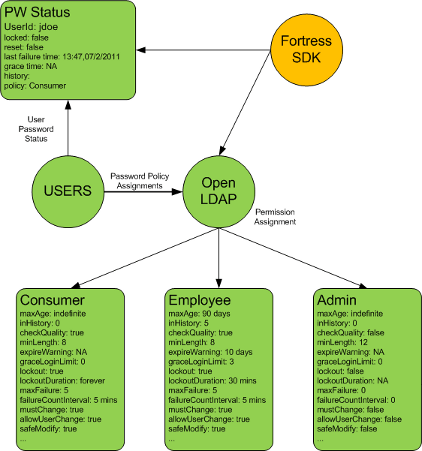
Apache Fortress adheres to IETF Password Policy Draft.  While this draft was never formally adopted it has traction within the various directory implementations and remains the de facto standard today.

Password Policy Enforcement

Password enforcement options include:

  1. A configurable limit on failed authentication attempts.
  2. A counter to track the number of failed authentication attempts.
  3. A time frame in which the limit of consecutive failed authentication attempts must happen before action is taken.
  4. The action to be taken when the limit is reached. The action will either be nothing, or the account will be locked.
  5. An amount of time the account is locked (if it is to be locked) This can be indefinite.
  6. Password expiration.
  7. Expiration warning
  8. Grace authentications
  9. Password history
  10. Password minimum age
  11. Password minimum length
  12. Password Change after Reset
  13. Safe Modification of Password
  14. Password Policy for LDAP Directories

What is Delegated Administration?

Defined

The ability to control access on the security system itself.  This control is exercised inside the policy administration programs.

In addition to what functions may be executed, we must control which entities to operate on.  A common use case is to allow User X the ability to reset and unlock passwords only for Users within Organization Y.  Another is the administrator may only assign a specific subset of Roles to Users who reside inside their Organization.  Additionally we must also be able to limit an Administrator to a specific subset of Roles in which to Grant to a subset of Permissions.  Indeed every API that changes state inside the back-end security repository must be governed via a well understood delegated administration policy.


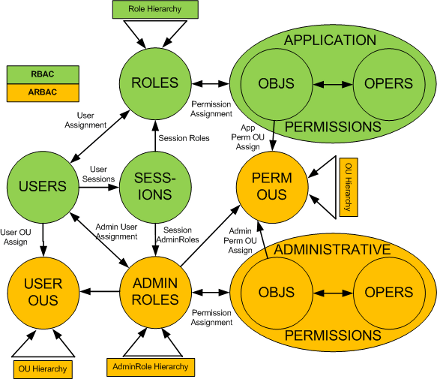
Administrative Role-Based Access Control (ARBAC)

Apache Fortress has implemented ARBAC02. [link to paper].  This is a formal model for Delegated Administration and builds on the ANSI RBAC specification.  The control is marshaled into three interfaces:

  1. Delegated Admin Manager – Provides CRUD for related entities like Administrative Roles and Permissions.
  2. Delegated Review Manager – Interrogation of Delegated Admin policy objects.
  3. Delegated Access Manager – Enforcement of Delegated Administration Policies.

1 & 2 are for management of the Delegated Admin policies themselves.  3 is for enforcement of Delegated Admin policies at runtime.


Delegated Admin Policy Enforcement

There are two types of controls:

  1. Ensure that the caller has the permission to call the security administrative method (e.g. addUser, addRole, addPermission,…)
  2. Ensure the caller is entitled to perform the function for a given organization (e.g. which Users and Permissions to grant access rights).

With Fortress, the Delegated Administration control is baked into its APIs.  The enforcement occurs during API invocation which means it can’t be circumvented by poorly implemented administrative programs.

In addition to control, every API invocation leaves an audit trail so you may determine what policies changed, by whom, when and where.