Install Apache Directory Studio From Source on Rasberry Pi

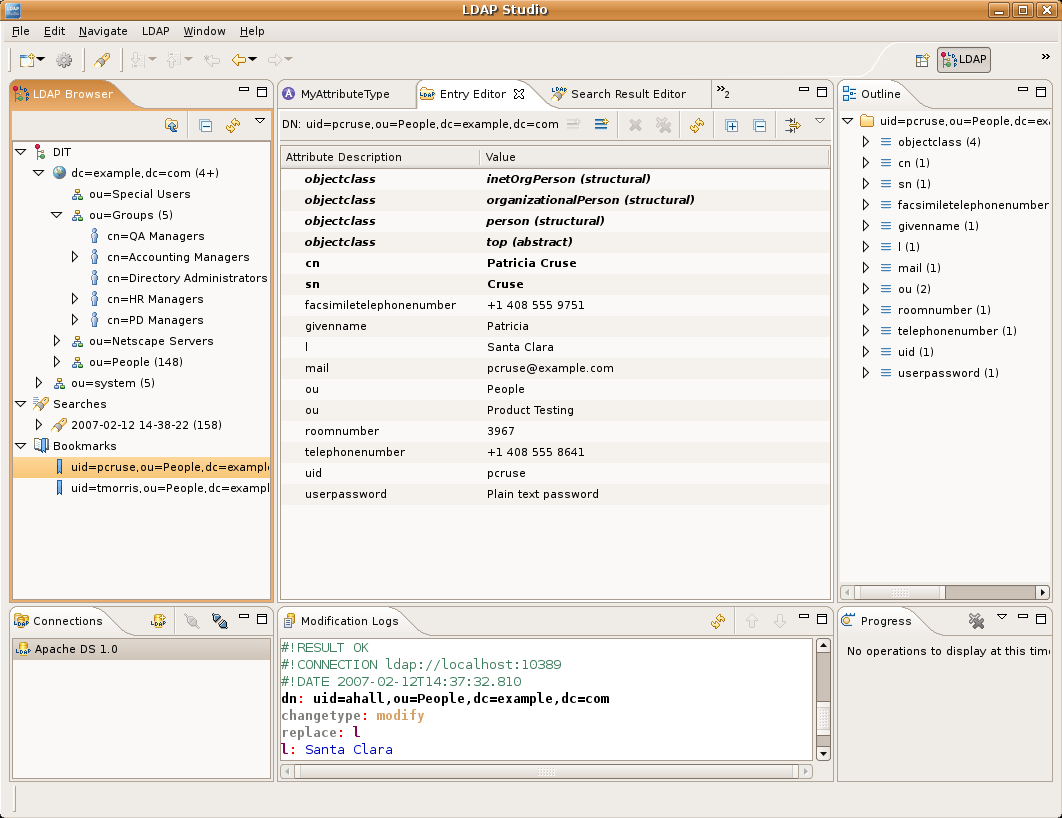
This post includes instructions to download Apache Directory Studio source code and install to a Linux machine. The instructions are tailored for a Raspberry Pi.

It includes an extra step to modify the pom.xml to add Eclipse runtime on Linux desktop for ARM processor.

It’s expected that the next release of Apache Directory Studio will include binaries for Linux ARM and so it won’t be necessary to build from source.

1. Preq it

```
sudo apt-get install git java
```

2. Git it

```
git clone https://github.com/apache/directory-studio.git
```

3. Arm it

```
cd directory-studio
vi pom.xml
# add (around line 167):
<environments>
...
  <environment> 
     <os>linux</os>
     <ws>gtk</ws>
     <arch>aarch64</arch>
  </environment>
...  
</environments>
...

Save and exit

4. Build it

```
mvn -f pom-first.xml clean install
mvn install -DskipTests=true
```

5. Install it

```
cp ./product/target/products/ApacheDirectoryStudio*.tar.gz ~/Tools
cd ~/Tools
tar -zxvf ApacheDirectoryStudio*.tar.gz
```

Where *Tools* is your target for applications.

6. Run it

```
cd ApacheDirectoryStudio
sudo ./ApacheDirectoryStudio
```

7. Script it

Because Apache Directory Studio has to run as root we have to create a bash script to execute.

```
# alter the paths to match your env:
vi ~/Tools/ApacheDirectoryStudio/start.sh
# add:
sudo /home/user/Tools/ApacheDirectoryStudio/ApacheDirectoryStudio
```

Save and exit.

8. Execute it

```
chmod a+x start.sh
```

9. Launch it

```
sudo vi /usr/share/applications/studio.desktop
# Paste info:
    [Desktop Entry]
    Type=Application
    Name=Apache Directory Studio
    Comment=LDAP Browser
    Icon=/home/user/Tools/ApacheDirectoryStudio/configuration/org.eclipse.osgi/78/0/.cp/studio.png
    Exec=/home/user/Tools/ApacheDirectoryStudio/start.sh
    Terminal=false
    Categories=Application;Development;
```

Save and exit. Where “/home/user/Tools” is where you put the binaries. Launcher will be under the “Programming” menu item.

Install Apache Netbeans From Source on Rasberry Pi

This post includes instructions to download Apache Netbeans source code and install to a Linux machine. The instructions are tailored for a Raspberry Pi.

The advantage of using a Pi is that Apache Netbeans works well in resource constrained environments. This makes it ideal for usage on that device.

Download Sources

We suggest the following location for your download

Do These Steps

1. Prereqs / Get it

```
sudo apt-get install ant java
wget https://dlcdn.apache.org/netbeans/netbeans/24/netbeans-24-source.zip .
```

2. Build / Install it

```
unzip ./netbeans-24-source.zip -d /tmp/netbeans
ant -Dcluster.config=basic build
mkdir ~/Tools
cp -r nbbuild/netbeans ~/Tools
```

3. Run it

```
cd ~/Tools/netbeans/bin
./netbeans
```

4. Launch it

```
sudo vi /usr/share/applications/netbeans.desktop
# Paste info:
[Desktop Entry]
Type=Application
Name=Netbeans
Comment=Java IDE
Icon=/home/user/Tools/netbeans/nb/netbeans.png
Exec=/home/user/Tools/netbeans/bin/netbeans
false=Terminal
Categories=Application;Development;
```

Where /home/user is the location of user’s home folder on the platform. Launcher will be under the “Programming” menu item.

Upgrade from javax to jakarta — not yet!

Javax-to-Jakarta Tales from the Crypt

It’s now been almost five years since Oracle announced the donation of Java’s enterprise layer to the Eclipse foundation. It stipulated a name change, removing “Java”, ostensibly due to trademark issues. Eclipse chose “Jakarta” as the new name.

As Java programmers, we understand organizational boundaries of dependent modules are enforced via package names. How we reference them in our code.

For many years now we’ve had this durable base of auxiliary software coming from the platform and the 3rd parties that comprise its ecosystem. It’s free and shields us from the intricacies and accelerates development. Makes our job easier. The reason I continue to use Java.

The programming language itself factors into why we choose to use it too. Java ranks at or near the top, in my estimation. We’re not discussing theory or practice here and I’m not trying to convince you the platform’s viable.

Back to the main point. There’s a cost associated with using free software, despite the language in which it was written. Sometimes it changes. Always for reasons outside of our control. That means we must change our code to accommodate. The Jakarta migration requires that millions (billions?) of lines-of-code be changed. We’re talking about the biggest disruption to the Java ecosystem in its 27 years.

Not a rant-post and we’re not going over tactics here. That has all been covered elsewhere. I will point out that converting the code is simple. Just change the package imports and pull in the newer versions of the libs into whatever dependency mechanism is being used.

If you can find all of them. As of today, many affected suppliers have published Jakarta compatible releases, some are still working on it, while still others have it on their roadmap.

That’s quite remarkable actually and demonstrates the robustness of the ecosystem. It’ll handle it — eventually.

The runtime’s ready, with a logjam in the projects upstream. Until all of the projects we use have published their compatible packages, we can’t migrate. In turn projects dependent on us must wait until we publish our conversion, and so on. We can replace our non-compliant libraries (a ton of work) or wait.

What’s hanging in the balance is which Servlet container runs and which version of the JVM will be in use. Older code can’t run in newer containers and vice versa. There are ways to sidestep the compatibility restrictions. Conversion routines that modify the packaged bytecode so it works with the jakarta namespace. Can you say shim? For me, I’ll wait just a bit longer. Hope it doesn’t take too long.

Update

April 24, 2023

Many of the suppliers are getting their migrated packages released. For example, Spring 6, Apache CXF 4 and Tomcat 10. Yesterday, I was able to run tests inside of Apache Fortress Rest runtime using them. Soon, Apache Fortress will be able to release its packages supporting jakarta. The logjam is finally starting to break up!